How to Optimize Google My Business: A Simple Guide That Actually Works
- haessam
- Sep 20, 2025
- 9 min read


Are you missing out on potential customers simply because they can't find your business on Google? Google my business optimization could be the game-changer you need.
Google Business Profile is a free tool that allows business owners to engage with customers directly on Google.
When people search for local services or products, optimized profiles are more likely to appear higher in the results. In fact, with proper GMB optimization, you can show up in the local pack, Maps, and organic search results simultaneously.
Additionally, a fully optimized profile provides searchers with all the information they need right in the search results. This means potential customers can find your hours, location, and contact details without even clicking through to your website.
Throughout this guide, you'll learn exactly how to set up, claim, and optimize your Google Business Profile to boost your local visibility and attract more customers. Let's get your business the attention it deserves on Google's first page!
Why Google My Business Matters
Your Google Business Profile exists at the intersection of local search and customer acquisition. Understanding its true value can transform how potential customers discover and interact with your business.
Boosts local visibility in search and maps
The numbers speak for themselves. Approximately 87% of consumers prefer using Google over other search engines to evaluate businesses. Moreover, when someone searches for services like "dentist near me," Google displays local results at the top of the page in what's called the "Local Pack".
This prominent placement matters since most customers click on these local results first. Google prioritizes businesses with complete, accurate information when determining which profiles to show in these valuable spots. Therefore, a well-optimized profile dramatically increases your chances of appearing where customers are actively looking.
Google determines local rankings based primarily on three factors: relevance to the search, distance from the searcher, and the popularity of your business. A properly optimized profile helps you excel in all three areas.
Helps control your brand's online presence
Your Google Business Profile functions as your digital business card. For many potential customers, this profile represents their first impression of your business, making it crucial to manage effectively.
While you provide the foundation of information, Google supplements it with additional data gathered from across the web. This creates an ongoing conversation about your brand that you need to actively manage.
Through your profile, you can:
Showcase your products or services
Enable direct booking or provide quotes
Respond to customer reviews and questions
Post updates about promotions or events
By maintaining control of these elements, you shape how both existing and new customers perceive your brand through search results.
Drives more calls, visits, and leads
Perhaps most importantly, a Google Business Profile directly generates customer actions.
Studies show that 5% of profile views convert into website clicks, calls, or direction requests. Furthermore, verified businesses receive an average of 1,803 monthly views, with 24% of these businesses getting more than 50 calls each month.
Visual content particularly drives engagement—businesses with photos receive 42% more direction requests and 35% more website clicks. Meanwhile, website clicks constitute nearly half (48%) of all user interactions.
The performance metrics provided with your profile help track these customer behaviors, showing exactly how people discover and engage with your business. This data proves invaluable for optimizing your marketing strategy and improving customer acquisition.
Setting Up and Claiming Your Profile
Image Source: Synup

Image Source: Synup
Securing your online presence begins with claiming your free Google Business Profile. This foundational step unlocks the full potential of your local search visibility and enables you to manage how customers find you online.
How to create or claim your GMB listing
Creating a new profile is straightforward. Initially, visit business.google.com/add and click "Add your business to Google." Subsequently, follow the on-screen instructions to enter your business details.
If a profile for your business already exists but remains unverified, you can claim it by searching for your business name and location on Google Search or Maps and selecting "Claim this business."
Notably, if someone else has already verified your business listing, you'll need to request ownership from the current profile owner. After submitting your request, the current owner has three days to respond. If they don't respond within that timeframe, you may have the option to claim the profile yourself.
Verifying your business with Google
Once you've created or claimed your profile, verification is essential before you can make changes or respond to reviews.
Google offers several verification methods depending on your business type:
Video verification - Record an unedited video showing your business location, proof of business existence, and management authorization
Postcard verification - Receive a physical postcard with a code (typically arrives within 5-14 days)
Phone verification - Get a verification code via automated call or text
Email verification - Receive your verification code via email
During the verification process, avoid editing your business name, address, or category as this could invalidate your verification code. After completing verification, Google reviews the information provided, which can take up to five business days.
Choosing the right business category
Selecting appropriate categories essentially tells Google what searches should trigger your business listing. Your primary category significantly impacts your local ranking—it's considered one of the most important local ranking factors.
Choose the most specific category that accurately describes your main business function rather than a general one.
You can add up to nine secondary categories to highlight additional services your business offers. For seasonal businesses, consider updating your primary category accordingly—for example, an HVAC business might switch from "Air conditioning repair service" to "Furnace repair service" during fall months.
Remember that optimizing these three elements—creating, verifying, and categorizing—forms the critical foundation for effective Google My Business optimization.
Key Areas to Optimize in Your Profile
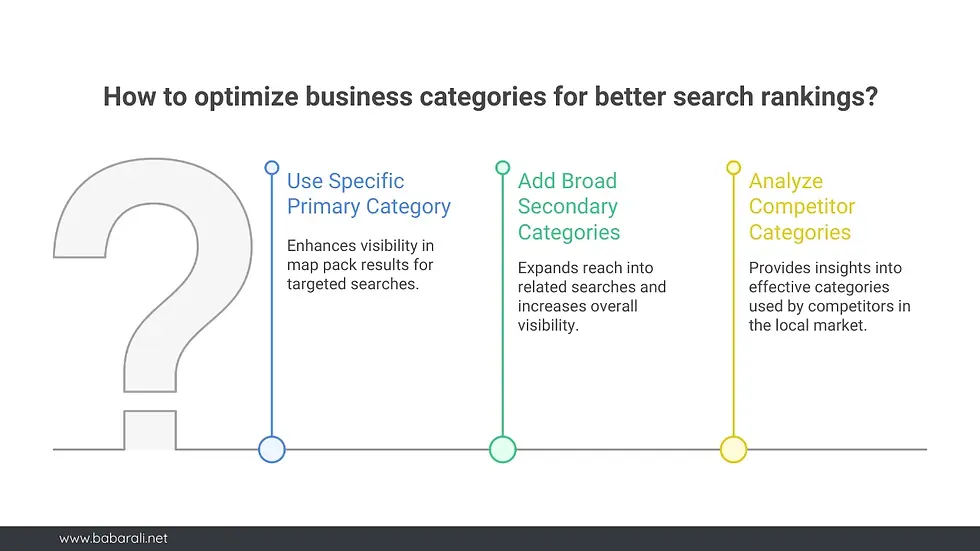
Image Source: Babar Ali
Unlike basic setup, thorough optimization of your Google Business Profile requires attention to several key elements that directly impact your local search performance.
Business name, address, and phone number (NAP)
Consistency is critical for your NAP information. When these details match exactly across your website, social media, directories, and Google Business Profile, search engines trust your business more.
Even slight variations can confuse Google and potential customers. The completeness of your NAP significantly affects how often your business appears in local searches.
Consider this your digital foundation—without accurate NAP information, other optimization efforts may fall short.
Business hours and holiday updates
Keeping your hours current prevents customer frustration and builds trust. For days with unusual schedules, set special hours through the "Hours" section. You can also indicate breaks during the day by creating multiple entries for the same day.
Whenever you update your hours, Google automatically creates a post confirming the change, which you can edit to provide additional context.
Photos and videos that attract attention
Businesses with photos receive 42% more direction requests and 35% more website clicks than those without. Upload high-quality images of your:
Exterior and interior spaces
Products and services
Team members and work processes
Photos should be JPG or PNG format between 10KB and 5MB, with recommended resolution of 720px × 720px. Videos must be under 30 seconds and 75MB, with 720p resolution or higher.
Using attributes and services
Attributes highlight specific features of your business, such as "free Wi-Fi" or "outdoor seating." These details appear in your profile and help your business show up in searches for those specific attributes.
Beyond basic information, you can add identity attributes like "woman-owned" or "veteran-owned," accessibility features, and sustainability practices.
Adding products or menus
Restaurants can showcase their menu items, complete with descriptions and prices, organized into sections like appetizers or main courses.
Retail businesses can upload products with images, descriptions, and pricing information. These details enhance your profile and help it rank for more specific searches.
Responding to reviews effectively
When responding to reviews, personalize your approach by addressing customers by name and thanking them for their feedback.
For negative reviews, apologize even if it wasn't your fault and offer solutions. Never engage in arguments online—53% of consumers expect businesses to respond within 7 days, yet 63% report never hearing back after posting a review.
Understanding the New Merchant Experience (NMX)
In 2021, Google completely transformed how you manage your business listing with the New Merchant Experience (NMX). This significant change eliminated the standalone dashboard in favor of direct management through Google Search and Maps.
What changed in the new interface
The old Google My Business dashboard is gone, replaced by in-SERP management for most businesses.
First, Google rebranded Google My Business to Google Business Profile to clarify that the platform serves all businesses, not just those with physical locations. Then, the company redesigned the management interface to emphasize direct editing from search results.
A row of icons now appears under the search bar when you're logged in, providing quick access to all profile functions.
How to edit your profile directly in search
To access NMX, simply search for your business name while logged into your account or type "my business" in Google Search.
From there, you'll see an "Edit profile" option that leads to sections for updating your basic information, hours, photos, and attributes. For advanced options like managing profile access or viewing your business ID, click the three dots in the upper right corner.
You can still respond to reviews, create posts (now called "updates"), and add products through this interface.
Features that may vary by business type
Depending on your business category, you'll notice different options available in NMX. Hotels might see amenities settings, restaurants can manage menus, and service businesses have options for booking links.
Some business types have access to unique features like "Activities" or "Tickets" sections. Furthermore, accessibility to specific features occasionally varies between Search and Maps interfaces.
Conclusion
Optimizing your Google Business Profile represents one of the most powerful yet underutilized tools for local business growth.
Throughout this guide, you've learned how a well-maintained profile boosts your visibility in local search results and directly connects you with potential customers actively searching for your services.
Remember that Google uses three primary factors to determine local rankings: relevance, distance, and prominence. Your optimized profile addresses all these elements simultaneously.
After claiming and verifying your business, consistent NAP information forms the foundation of your digital presence, while additional elements like accurate business hours, high-quality photos, and detailed attributes create a comprehensive business listing that attracts attention.
Additionally, the transition to the New Merchant Experience has simplified profile management, allowing you to make real-time updates directly through Google Search or Maps. This streamlined approach means you can quickly respond to reviews, add new photos, or update service offerings without navigating complex dashboards.
Most importantly, Google Business Profile optimization delivers tangible results. Businesses with fully optimized profiles receive significantly more calls, website visits, and direction requests than their competitors. Therefore, the time invested in optimization translates directly into increased foot traffic and sales.
Start implementing these optimization strategies today. Once your profile stands out with complete information, engaging visuals, and responsive customer interaction, you'll notice increased visibility in local searches.
Because local customers rely heavily on Google to find businesses, your optimized profile will undoubtedly become one of your most valuable marketing assets.
Key Takeaways
Master these essential Google Business Profile optimization strategies to dramatically increase your local visibility and attract more customers searching for your services.
• Complete your NAP consistently - Ensure your business name, address, and phone number match exactly across all platforms to build search engine trust and improve local rankings.
• Add high-quality photos and videos - Businesses with visual content receive 42% more direction requests and 35% more website clicks than those without.
• Respond to all reviews within 7 days - 53% of consumers expect responses, yet 63% never hear back, making timely engagement a competitive advantage.
• Use the New Merchant Experience (NMX) - Edit your profile directly through Google Search by typing "my business" while logged in for real-time updates.
• Optimize with specific categories and attributes - Choose the most precise primary category and add relevant attributes like "free Wi-Fi" to appear in targeted searches.
A fully optimized Google Business Profile can generate an average of 1,803 monthly views with 24% of businesses receiving over 50 calls per month.
The key is consistency across all profile elements and active engagement with customer feedback to maximize your local search performance.
FAQs
Q1. How can I improve my business's visibility on Google? To improve your business's visibility on Google, ensure your Google Business Profile is complete and accurate. Use relevant keywords in your business description, add high-quality photos, and regularly post updates. Encourage customers to leave reviews and respond to them promptly. Also, make sure your website is optimized for local SEO.
Q2. What are the key elements to optimize in my Google Business Profile? The key elements to optimize in your Google Business Profile include your business name, address, and phone number (NAP), business hours, photos and videos, attributes and services, products or menus, and customer reviews. Ensure all information is accurate, up-to-date, and consistent across all online platforms.
Q3. How often should I update my Google Business Profile? It's best to update your Google Business Profile regularly. At a minimum, review and update your information monthly. However, you should make immediate changes for any significant updates like new hours, temporary closures, or new services. Regular posts and photo updates can also help keep your profile fresh and engaging.
Q4. How can I effectively respond to customer reviews on my Google Business Profile? When responding to reviews, personalize your approach by addressing the customer by name. Thank them for their feedback, whether positive or negative. For negative reviews, apologize for their experience and offer a solution or invite them to discuss the issue privately. Always respond professionally and avoid arguments online.
Q5. What is the New Merchant Experience (NMX) and how does it affect my Google Business Profile management? The New Merchant Experience (NMX) is Google's updated interface for managing your Business Profile. It allows you to edit your profile directly through Google Search or Maps, eliminating the need for a separate dashboard. To access NMX, simply search for your business name or "my business" while logged into your Google account, and you'll see options to edit your profile, respond to reviews, and manage other aspects of your listing.


